Withdraw skins from the marketplace
Link Epic, add FortBux bots for 48 hours, then redeem eligible Bux for skins.
Before you can withdraw skins
Skin withdrawals need your Fortnite account linked and FortBux bots added for long enough. Do this before you shop the marketplace.
Link Fortnite
Connect Epic from Settings or Add Bots
Add bots
Add at least 2 FortBux bots on Epic
Wait 48 hours
Keep bots added before skin withdraws unlock
1. Link your Fortnite account
Link your Epic / Fortnite account to FortBux. You can start from Settings, or from the Add Bots page with Link Fortnite Account.
- 1
Open Add Bots (or Settings) and click Link Fortnite Account.
- 2
Follow the popup instructions carefully until the link completes.
2. Add FortBux bots
Once your account is linked, use the Add Bots page to unlock skin gifting.
- 1
Go to Add Bots.
- 2
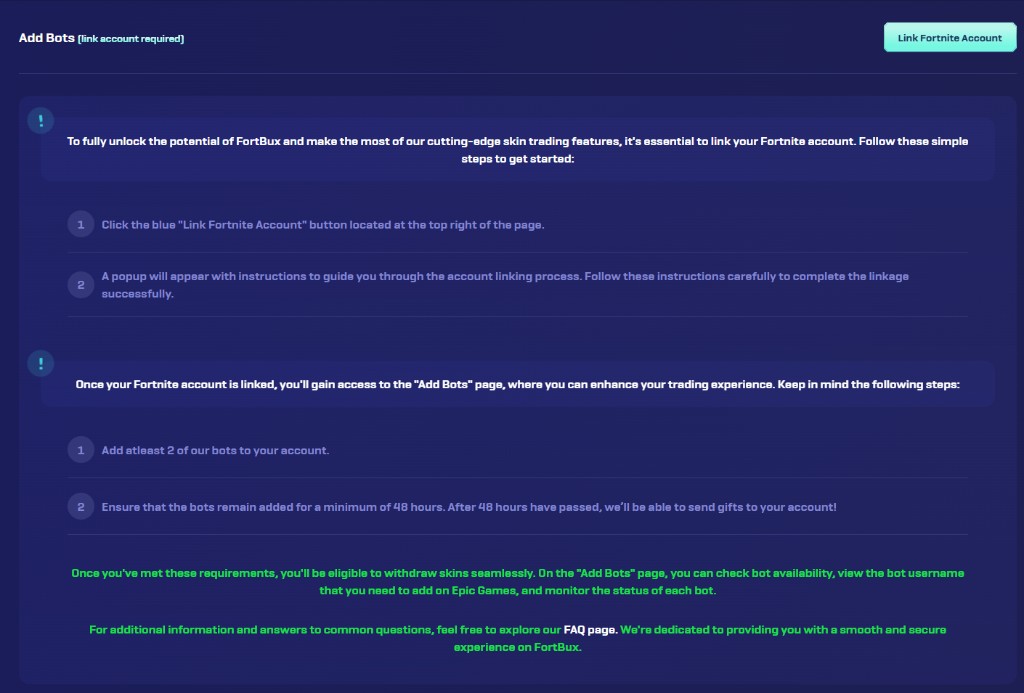
Add at least 2 of our bots to your Epic / Fortnite friends list. The page shows which bot usernames to add and whether each bot is available.
- 3
Keep those bots added for a minimum of 48 hours. After 48 hours have passed, FortBux can send gifts to your account.
Important
Skin withdraws are not available until the bots have stayed added for the full 48 hours. Check bot status on the Add Bots page while you wait.
On Add Bots you can also check bot availability, see the exact bot username to add on Epic Games, and monitor each bot’s status. More detail is on the in-site FAQ linked from that page.
Withdraw skins
When linking and the 48-hour bot requirement are done, and your account meets wager / deposit eligibility:
- 1
Confirm you meet FortBux withdraw rules (see Earn, play, and level up).
- 2
Open Withdraw and choose Skins.
- 3
Browse inventory and open the item you want.
- 4
Confirm the purchase with your Bux balance.
- 5
Follow any trade or gift delivery instructions shown on screen.
Good to know
The skins marketplace is for eligible accounts only. Stock, purchase limits, and account checks may apply.
Things to know
- Marketplace stock changes often.
- If a trade or gift fails, do not retry blindly. Check the on-screen status first, then contact support.
- Keep the required bots added. Removing them too early can block skin withdrawals.
Browse more redeem options in Withdraw methods overview.